

Execution environment
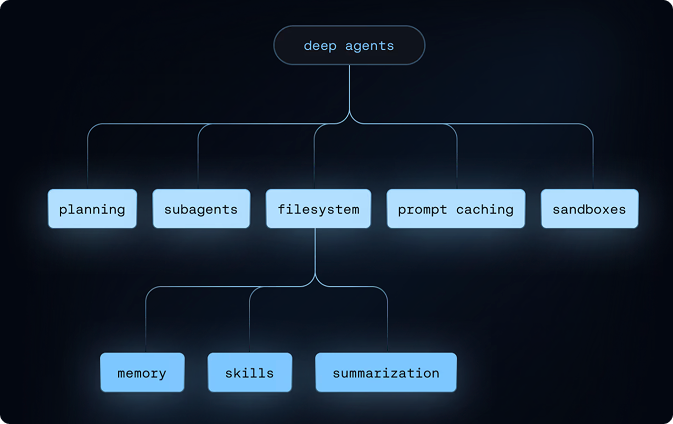
Tools、virtual filesystem、可选 sandbox 和 REPL(interpreter)
Context management
Skills、memory、summarization、context offloading 和 prompt caching
Delegation
Subagent spawning 和 task planning
Steering
Human-in-the-loop approval 和 interrupts
Execution environment
Execution environment 是 agent 执行动作的位置。它有四层:- Tools:Agent 可以调用的 custom functions、APIs 和 databases
- Virtual filesystem:由 pluggable backends 支撑的 file tools
- Filesystem permissions:对 agents 可以 read 或 write 的 paths 进行 declarative access control
- Code execution:Sandboxed shell execution 和 in-process JavaScript interpreter
Tools
通过tools= parameter 将任意 Python callable、LangChain tool 或 tool dict 传给 create_deep_agent。这些是你的 agent 可以执行的 domain-specific actions,例如 web search、database queries、API calls,或你定义的任何 function。
Virtual filesystem access
Harness 提供可配置的 virtual filesystem,可由不同的 pluggable backends 支撑。 这些 backends 支持以下 file system operations:| Tool | Description |
|---|---|
ls | 列出 directory 中的 files 及 metadata(size、modified time) |
read_file | 读取带 line numbers 的 file contents,支持为 large files 设置 offset/limit。也支持为 non-text files(images、video、audio 和 documents)返回 multimodal content blocks。请参阅下方 supported extensions。 |
write_file | 创建 new files |
edit_file | 在 files 中执行 exact string replacements(带 global replace mode) |
glob | 查找匹配 patterns 的 files(例如 **/*.py) |
grep | 使用多种 output modes 搜索 file contents(仅 files、带 context 的 content,或 counts) |
execute | 在 environment 中运行 shell commands(仅适用于 sandbox backends) |
Supported multimodal file extensions
Supported multimodal file extensions
Running without the default filesystem tools
Running without the default filesystem tools
若要对 model 隐藏上面列出的 filesystem tools,请使用 通过
excluded_tools 注册 harness profile:excluded_middleware 移除 FilesystemMiddleware 本身会被有意拒绝。请使用 excluded_tools 只隐藏 model-visible tool surface,并保留 middleware。若要移除 task tool,请参阅 Running without subagents。Filesystem permissions
Harness 支持 declarative permission rules,用于控制 agent 可以 read 或 write 哪些 files 和 directories。Permissions 会应用于上面列出的 built-in filesystem tools,并按 declaration order 以 first-match-wins semantics 求值。 工作原理:- 创建 agent 时向
permissions=传入 rules list - 每条 rule 指定
operations("read"、"write")、paths(glob patterns)和mode("allow"或"deny") - 第一条匹配的 rule 生效。如果没有 rule 匹配,则允许该 operation。
- 将 agents 限制在特定 directories(例如
/workspace/) - 保护 sensitive files(例如
.env、credentials) - 为 subagents 提供比 parent agent 更窄的 access
execute tool 支持任意 command execution。对于 custom validation logic,请使用 backend policy hooks。
完整 rule structure、examples 和 subagent inheritance 请参阅 Permissions。
Code execution
Deep Agents 通过两种方式支持 code execution:- Sandbox backends 会暴露
executetool,用于在 isolated environment 中运行 shell commands。 - Interpreters 会添加
evaltool,用于在 scoped QuickJS runtime 中运行 JavaScript。
SandboxBackendProtocolV2;harness 检测到它时,会将 execute tool 添加到 agent 的 available tools 中。
当 agent 需要轻量 programmable layer 来执行 loops、batching、deterministic data transformations 或 programmatic tool calling 时,请使用 interpreters。Interpreters 不提供 shell access、package installs,或 filesystem 和 network access。
Sandbox setup、providers 和 file transfer APIs 请参阅 Sandboxes。QuickJS runtime 和 programmatic tool calling 请参阅 Interpreters。
Context management
Context management component 控制 agent 知道什么、能在 token limits 内运行多久,以及跨 sessions 保留什么。它有四层:- Skills,按需从 skill files 逐步加载的 domain knowledge
- Memory,startup 时从
AGENTS.mdfiles 加载的 persistent instructions 和 preferences - Summarization and context offloading,自动压缩 conversation history 和 large tool results
- Prompt caching,static prompt sections 可被 cache,以便在 supported models 上加速 inference 并降低 cost
Skills
Harness 支持 skills,用于为你的 deep agent 提供 specialized workflows 和 domain knowledge。 工作原理:- Skills 遵循 Agent Skills standard
- 每个 skill 都是包含
SKILL.mdfile 的 directory,内含 instructions 和 metadata - Skills 可以包含额外 scripts、reference docs、templates 和其他 resources
- Skills 使用 progressive disclosure,只有当 agent 判断它们对当前 task 有用时才加载
- Agent 在 startup 时读取每个
SKILL.mdfile 的 frontmatter,然后在需要时查看完整 skill content
- 只在需要时加载 relevant skills,减少 token usage
- 将 capabilities 与额外 context 打包成更大的 actions
- 提供 specialized expertise,而不会让 system prompt 变得杂乱
- 支持 modular、reusable agent capabilities
Memory
Harness 支持 persistent memory files,为你的 deep agent 在 conversations 之间提供额外 context。 这些 files 通常包含 general coding style、preferences、conventions 和 guidelines,帮助 agent 理解如何处理你的 codebase 并遵循你的 preferences。 工作原理:- 使用
AGENTS.mdfiles 提供 persistent context - Memory files 会始终加载(不同于使用 progressive disclosure 的 skills)
- 创建 agent 时将一个或多个 file paths 传给
memoryparameter - Files 存储在 agent 的 backend 中(StateBackend、StoreBackend 或 FilesystemBackend)
- Agent 可以根据你的 interactions、feedback 和 identified patterns 更新 memory
- 提供不需要每次 conversation 重新指定的 persistent context
- 适合存储 user preferences、project guidelines 或 domain knowledge
- 始终可供 agent 使用,确保 consistent behavior
Summarization and context offloading
Harness 会管理 context,使 deep agents 能够在 token limits 内处理 long-running tasks,同时保留所需信息。 工作原理:- Input context,System prompt、memory、skills 和 tool prompts 会塑造 agent 在 startup 时知道什么
- Compression,内置 offloading 和 summarization 会在 tasks 推进时让 context 保持在 window limits 内
- Isolation,Subagents 隔离 heavy work,只返回 results(请参阅 Delegation)
- Long-term memory,通过 virtual filesystem 在 threads 之间持久存储
- 支持超过单个 context window 的 multi-step tasks
- 无需 manual trimming,也能保留最相关信息
- 通过 automatic summarization 和 offloading 减少 token usage
Prompt caching
对于 Anthropic models,create_deep_agent 会自动对 system prompt 中的 static sections 应用 prompt caching,这些 sections 包括每 turn 重复的 base agent instructions、memory 和 skill content。这避免了跨 calls 重复处理相同 tokens,从而降低 long-running agents 的 latency 和 cost。
使用 Anthropic model 时,prompt caching 默认启用。不需要配置。
对于其他 providers,请参阅 Middleware integrations,了解可用的 provider-specific caching middleware。
Delegation
Delegation component 让 agents 可以把 large problems 拆成更小、可并行的 work units。它有两层:- Task planning:用于 structured task tracking 的内置
write_todostool - Subagents:处理 isolated subtasks 的 ephemeral child agents
Task planning
Harness 提供write_todos tool,agents 可以用它维护 structured task list。
Features:
- 使用 statuses(
'pending'、'in_progress'、'completed')跟踪多个 tasks - 持久保存在 agent state 中
- 帮助 agent 组织 complex multi-step work
- 适合 long-running tasks 和 planning
Subagents
Harness 允许 main agent 为 isolated multi-step tasks 创建 ephemeral “subagents”。 为什么有用:- Context isolation,Subagent 的 work 不会污染 main agent 的 context
- Parallel execution,多个 subagents 可以 concurrent 运行
- Specialization,Subagents 可以拥有不同 tools 和 configurations
- Token efficiency,Large subtask context 会压缩成单个 result
- Main agent 拥有
tasktool - 调用时,它会创建带自身 context 的 fresh agent instance
- Subagent 自主执行直到完成
- 向 main agent 返回单个 final report
- 可以使用 default
general-purposesubagent(默认启用),或添加 custom subagents - Subagents 是 stateless 的(不能返回多个 messages)
Running without subagents (no `task` tool)
Running without subagents (no `task` tool)
若要运行没有
task tool 的 agent,请参阅 Running without subagents。不要尝试通过 excluded_middleware 移除 SubAgentMiddleware,这会被有意拒绝。请改为通过 harness profile 禁用 auto-added subagent,并且不要通过 subagents= 传入 synchronous subagents。Async subagents 不受影响。Steering
Steering component 让 humans 能够在 runtime 控制 agent behavior。Human-in-the-loop
Harness 可以在指定 tool calls 处暂停 agent execution,以允许 human approval 或 modification。该 feature 通过interrupt_on parameter 选择启用。
Configuration:
- 将
interrupt_on传给create_deep_agent,其值为 tool names 到 interrupt configurations 的 mapping - 示例:
interrupt_on={"edit_file": True}会在每次 edit 前暂停 - Prompted 时,你可以提供 approval messages 或修改 tool inputs
- 为 destructive operations 设置 safety gates
- 在 expensive API calls 前进行 user verification
- 支持 interactive debugging 和 guidance
Harness profiles
每当选择给定 provider 或 model 时,harness 都可以应用 declarative configuration bundle(HarnessProfile)。Profiles 会在 model 构建后调整 runtime behavior,而无需 per-agent setup code。
工作原理:
- 在 provider name(
"openai")或provider:modelkey("openai:gpt-5.4")下注册 profile create_deep_agent会在解析 model 时查找并应用 profile- Provider-level 和 model-level profiles 会在 resolution time 合并
- 将 per-provider 或 per-model defaults(system-prompt tweaks、tool overrides、middleware)打包到一个位置
- 切换 models 时保持
create_deep_agentcall site 不变 - 通过 entry points 将 reusable profiles 作为 plugins 发布
Connect these docs to Claude, VSCode, and more via MCP for real-time answers.