

Context 类型
| Context Type | 你控制的内容 | Scope |
|---|---|---|
| Input context | Startup 时进入 agent prompt 的内容(system prompt、memory、skills) | Static,每次 run 应用 |
| Runtime context | Invoke time 传入的 static configuration(user metadata、API keys、connections) | Per run,传播到 subagents |
| Context compression | 内置 offloading 和 summarization,使 context 保持在 window limits 内 | Automatic,接近 limits 时触发 |
| Context isolation | 使用 subagents 隔离 heavy work,只将 results 返回给 main agent | Per subagent,delegated 时应用 |
| Long-term memory | 使用 virtual filesystem 跨 threads 进行 persistent storage | 跨 conversations 持久 |
Input context
Input context 是 startup 时提供给 deep agent,并成为其 system prompt 一部分的信息。Final prompt 由多个 sources 组成:System prompt
你提供的 custom instructions 加上 built-in agent guidance。
Memory
配置后始终加载的 persistent
AGENTS.md files。Skills
相关时加载的 on-demand capabilities(progressive disclosure)。
Tool prompts
使用 built-in tools 或 custom tools 的 instructions。
System prompt
Custom system prompt 会 prepend 到 built-in system prompt 前面,后者包含 planning、filesystem tools 和 subagents 的 guidance。使用它定义 agent 的 role、behavior 和 knowledge:systemPrompt parameter 是 static,这意味着它不会随每次 invocation 改变。
对于某些 use cases,你可能需要 dynamic prompt:例如告诉 model “You have admin access” 或 “You have read-only access”,或从 long-term memory 注入 “User prefers concise responses” 等 user preferences。
如果 prompt 依赖 context 或 runtime.store,请使用 dynamicSystemPromptMiddleware 构建 context-aware instructions。
你的 middleware 可以读取 request.runtime.context 和 request.runtime.store。
添加 custom middleware 请参阅 Customization,示例请参阅 LangChain context engineering guide。
当只有 tools 使用 context 或 runtime.store 时,你不需要 middleware;tools 会直接接收 runtime object(包括 runtime.context 和 runtime.store)。只有当 system prompt 本身必须随 request 变化时,才添加 middleware。
Memory
Memory files(AGENTS.md)提供会始终加载到 system prompt 的 persistent context。使用 memory 保存 project conventions、user preferences,以及应适用于每个 conversation 的 critical guidelines:
Skills
Skills 提供 on-demand capabilities。Agent 会在 startup 时读取每个SKILL.md 的 frontmatter,然后只在判断 skill 相关时加载完整 skill content。这既能减少 token usage,也能提供 specialized workflows:
Tool prompts
Tool prompts 是塑造 model 如何使用 tools 的 instructions。所有 tools 都会暴露 model 在 prompt 中看到的 metadata,通常是 schema 和 description。你通过tools parameter 传入的 tools 会向 model 暴露这些 tool metadata(schema 和 descriptions)。Deep agent 的 built-in tools 被打包在 middleware 中,通常也会用更多 tool guidance 更新 system prompt。
Built-in tools:添加 harness capabilities(planning、filesystem、subagents)的 middleware 会自动将 tool-specific instructions 追加到 system prompt,创建说明如何有效使用这些 tools 的 tool prompts:
- Planning prompt:维护 structured task list 的
write_todosinstructions - Filesystem prompt:
ls、read_file、write_file、edit_file、glob、grep的 documentation(以及使用 sandbox backend 时的execute) - Subagent prompt:使用
tasktool 委派 work 的 guidance - Human-in-the-loop prompt:在指定 tool calls 处暂停的 usage(设置
interrupt_on时) - Local context prompt:当前 directory 和 project info(仅 CLI)
tools parameter 传入的 tools 会将其 descriptions(来自 tool schema)发送给 model。你也可以添加 custom middleware,由它添加 tools 并追加自己的 system prompt instructions。
对于你提供的 tools,请确保提供清晰的 name、description 和 argument descriptions。这些会引导 model 判断何时以及如何使用 tool。请在 description 中包含何时使用 tool,并描述每个 argument 的作用。
Complete system prompt
Deep agent 的 system message,也就是 model 在 run 开始时收到的 assembled system prompt,由以下部分组成:- Custom
system_prompt(如果提供) - Base agent prompt
- To-do list prompt:如何使用 to do lists 进行 planning 的 instructions
- Memory prompt:
AGENTS.md+ memory usage guidelines(仅提供memory时) - Skills prompt:Skills locations + 带 frontmatter information 的 skills list + usage(仅提供 skills 时)
- Virtual filesystem prompt (filesystem + execute tool docs if applicable)
- Subagent prompt:Task tool usage
- User-provided middleware prompts(如果提供 custom middleware)
- Human-in-the-loop prompt(设置
interrupt_on时)
Runtime context
Runtime context 是你调用 agent 时传入的 per-run configuration。它不会自动包含在 model prompt 中;只有当 tool、middleware 或其他 logic 读取它并添加到 messages 或 system prompt 时,model 才能看到它。将 runtime context 用于 user metadata(IDs、preferences、roles)、API keys、database connections、feature flags,或 tools 和 harness 需要的其他 values。 Define the shape of that data withcontextSchema, typically a Zod object schema (for example z.object({ ... })). Pass runtime values in the context field of the options object you pass to invoke / ainvoke. See Runtime and LangGraph runtime context for full detail.
Inside tools, read runtime.context from the ToolRuntime instance supplied as the tool handler’s runtime argument:
Context compression
Long-running tasks 会产生 large tool outputs 和 long conversation history。 Context compression 会在保留 task 相关 details 的同时,减少 agent working memory 中 information 的大小。 以下 techniques 是内置 mechanisms,用于确保传给 LLMs 的 context 保持在其 context window limit 内:Offloading
Large tool inputs 和 results 存储到 filesystem 中,并替换为 references。
Summarization
接近 limits 时,old messages 会压缩为 LLM-generated summary。
Offloading
Deep Agents 使用 built-in filesystem tools 自动 offload content,并按需搜索和检索 offloaded content。 当 tool call inputs 或 results 超过 token threshold(默认 20,000)时,会发生 content offloading:-
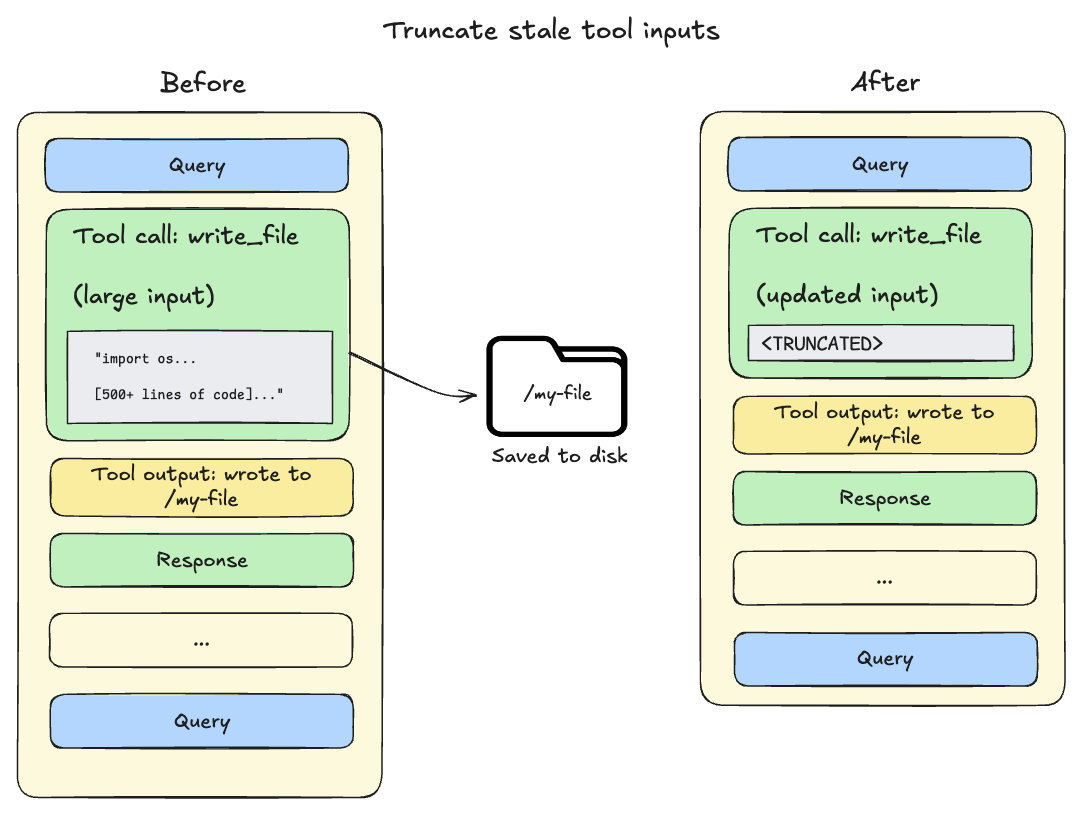
Tool call inputs 超过 20,000 tokens:File write 和 edit operations 会在 agent conversation history 中留下包含完整 file content 的 tool calls。
由于此 content 已经持久化到 filesystem,它通常是冗余的。
当 session context 超过 model available window 的 85% 时,deep agents 会 truncate 较早的 tool calls,用指向 disk 上 file 的 pointer 替换它们,从而减少 active context 的大小。
-
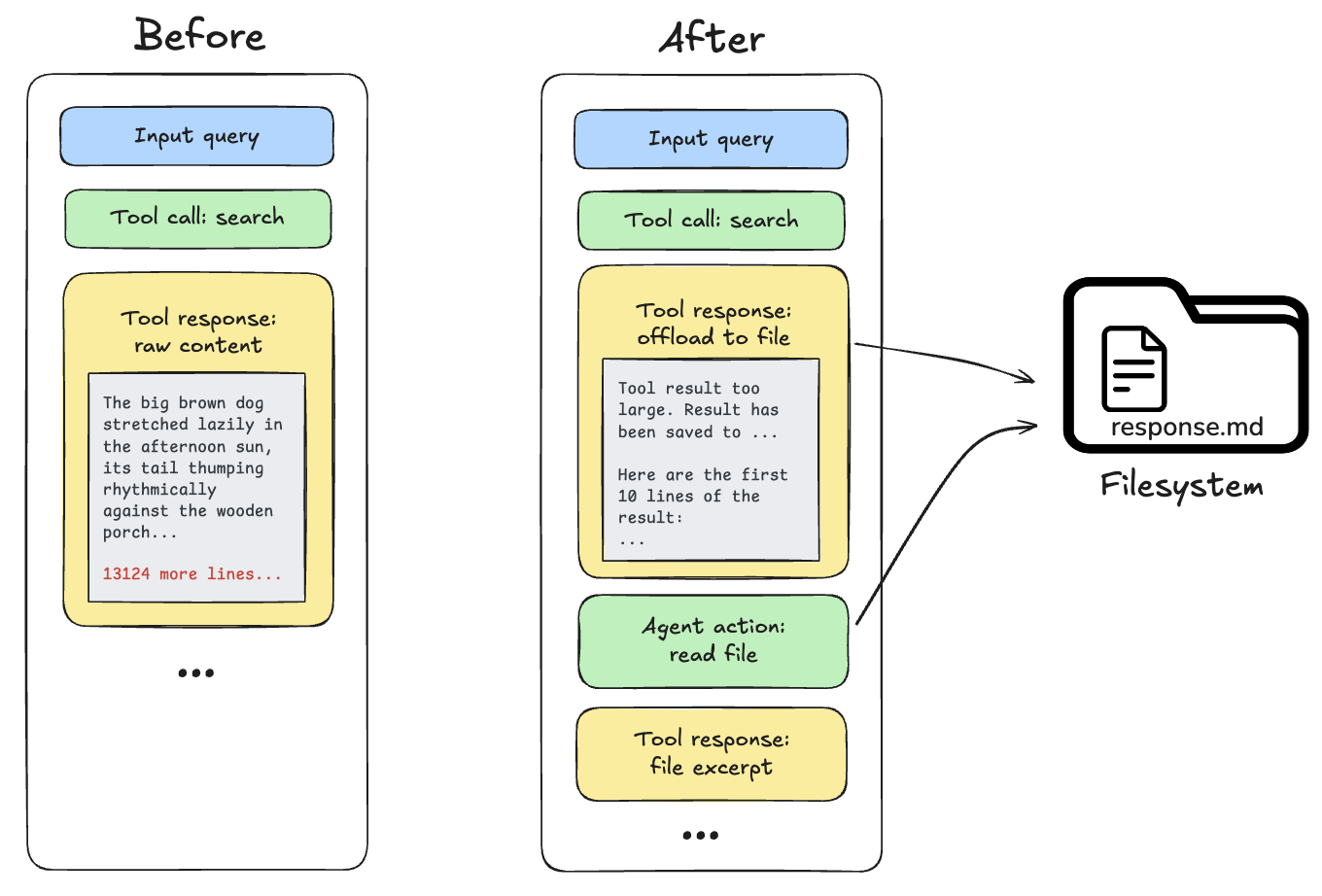
Tool call results 超过 20,000 tokens:发生这种情况时,deep agent 会将 response offload 到 configured backend,并用 file path reference 和前 10 行 preview 替代它。Agents 之后可以按需重新读取或搜索该 content。
Multimodal inputs
Deep Agents 支持 multimodal inputs,例如read_file 返回或 messages 中提供的 images,但内置 context management mechanisms 主要面向 text 和 message-history。它们不会 resize images、降低 image resolution,或生成 reusable visual embeddings。
对于 multimodal workloads,请尽可能让 large media 不进入 active message history:
- 将 images、screenshots 和 charts 存储在 filesystem backend 或 external object store 中,然后通过 messages 传递 file paths 或 URLs。
- 在 long-running conversations 中,优先使用 references,而不是 base64-encoded image blocks。
- 如果 tool 生成 image,请让 tool 保存 image,并返回 concise text description 以及 path 或 URL。
- 对 image-heavy inspection work 使用 subagents,让 main agent 接收 compact text result,而不是每个 multimodal intermediate step。
- 当 model provider 对 images 收取很多 tokens 时,调整 summarization thresholds 或提供 custom token counter。
Summarization
当前 summarization behavior(通过
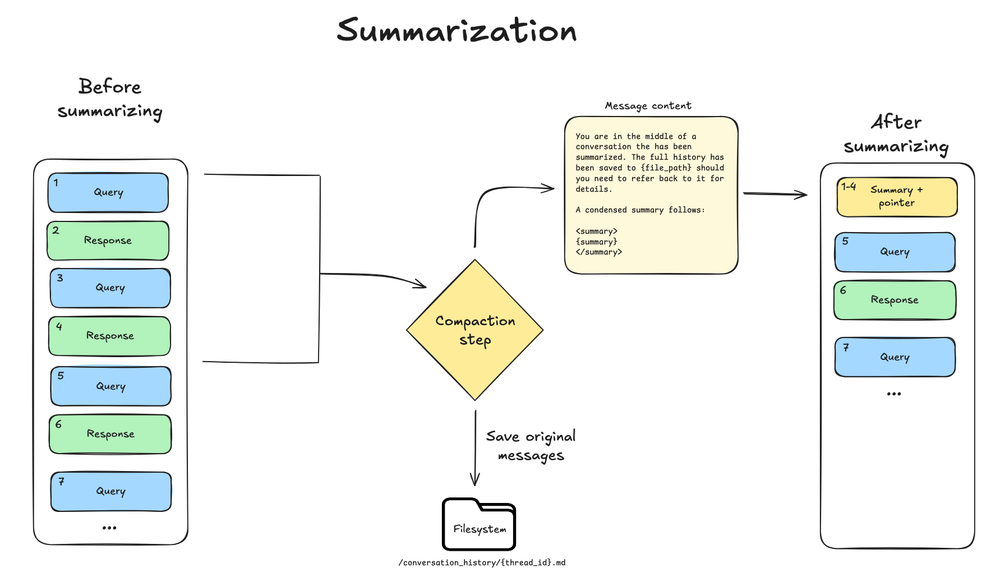
wrapModelCall 进行 in-model summarization、accurate token counting,以及 automatic ContextOverflowError fallback)需要 deepagents>=1.6.0。max_input_tokens 的 85%),且没有更多 context 可以 offload 时,deep agent 会 summarize message history。
此 process 包含两个 components:
- In-context summary:LLM 生成 conversation 的 structured summary,包括 session intent、artifacts created 和 next steps,用它替换 agent working memory 中的 full conversation history。
- Filesystem preservation:Original conversation messages 的 text rendering 会作为 canonical record 写入 filesystem。
 Configuration:
- 在 model profile 中 model
max_input_tokens的 85% 处触发 - 保留 10% tokens 作为 recent context
- 如果 model profile 不可用,则回退到 170,000-token trigger / 保留 6 条 messages
- 如果任何 model call 抛出标准 ContextOverflowError,deep agent 会立即回退到 summarization,并用 summary + recent preserved messages retry
- Older messages 由 model summarize
Context isolation with subagents
Subagents 解决 context bloat problem。当 main agent 使用带 large outputs 的 tools(web search、file reads、database queries)时,context window 会很快填满。Subagents 会隔离这类 work,main agent 只接收 final result,而不是产生 result 的几十个 tool calls。你还可以将每个 subagent 与 main agent 分开配置(例如 model、tools、system prompt 和 skills)。 工作方式:- Main agent 有
tasktool 用于 delegate work - Subagent 使用自己的 fresh context 运行
- Subagent autonomously 执行直到 completion
- Subagent 向 main agent 返回单个 final report
- Main agent context 保持 clean
- Delegate complex tasks:对会 clutter main agent context 的 multi-step work 使用 subagents。
-
保持 subagent responses 简洁:指示 subagents 返回 summaries,而不是 raw data:
- 对 large data 使用 filesystem:Subagents 可以将 results 写入 files;main agent 读取自己需要的内容。
Long-term memory
使用 default filesystem 时,deep agent 会将 working memory files 存储在 agent state 中,这些内容只在单个 thread 内持久存在。 Long-term memory 让 deep agent 可以跨不同 threads 和 conversations 持久化 information。 Deep agents 可以使用 long-term memory 存储 user preferences、accumulated knowledge、research progress,或任何应在单个 session 之外持久保存的信息。 若要使用 long-term memory,必须使用CompositeBackend,将特定 paths(通常为 /memories/)路由到 LangGraph Store,后者提供 durable cross-thread persistence。
CompositeBackend 是 hybrid storage system,其中一些 files 无限期持久存在,其他 files 仍作用域限定于单个 thread。
/memories/。
你提供 backend config、store,以及告诉 agent 保存什么和保存到哪里的 system prompt instructions。
例如,你可以提示 agent 将 preferences 存储到 /memories/preferences.txt。
该 path 初始为空,当 users 分享值得记住的信息时,agent 会使用其 filesystem tools(write_file、edit_file)按需创建 files。
若要 pre-seed memories,请在 LangSmith 上部署时使用 Store API。
Setup 和 use cases 请参阅 Long-term memory。
Best practices
- 从正确的 input context 开始:对始终相关的 conventions 保持 memory 精简;对 task-specific capabilities 使用 focused skills。
- 用 subagents 处理 heavy work:Delegate multi-step、output-heavy tasks,让 main agent context 保持 clean。
- 在 configuration 中调整 subagent outputs:如果 debug 时发现 subagents 生成 long output,可以向 subagent 的
system_prompt添加 guidance,让它创建 summaries 和 synthesized findings。 - 使用 filesystem:将 large outputs 持久化到 files(例如 subagent writes 或 automatic offloading),使 active context 保持小;model 需要 details 时可以用
read_file和grep拉取 fragments。 - 记录 long-term memory structure:告诉 agent
/memories/中有什么以及如何使用。 - 为 tools 传入 runtime context:将
context用于 user metadata、API keys 和 tools 需要的其他 static configuration。
Related resources
- Harness:Context management overview、offloading、summarization
- Subagents:Context isolation、runtime context propagation
- Long-term memory:Cross-thread persistence
- Skills:Progressive disclosure 和 skill authoring
- Backends:Filesystem backends 和 CompositeBackend
- Context conceptual overview:Context types 和 lifecycle
Connect these docs to Claude, VSCode, and more via MCP for real-time answers.