Deep agent 可以创建 subagents 来 delegate work。你可以在 subagents parameter 中指定 custom subagents。Subagents 适用于 context quarantine(保持 main agent 的 context clean),也适用于提供 specialized instructions。
本页介绍 synchronous subagents,即 supervisor 会 block,直到 subagent 完成。对于 long-running tasks、parallel workstreams,或需要 mid-flight steering 和 cancellation 的场景,请参阅 Async subagents。
Why use subagents?
Subagents 解决 context bloat problem。当 agents 使用具有 large outputs 的 tools(web search、file reads、database queries)时,context window 会很快被 intermediate results 填满。Subagents 会隔离这些 detailed work,main agent 只接收 final result,而不是生成该结果的 dozens of tool calls。
何时使用 subagents:
- ✅ 会 clutter main agent context 的 multi-step tasks
- ✅ 需要 custom instructions 或 tools 的 specialized domains
- ✅ 需要 different model capabilities 的 tasks
- ✅ 希望 main agent 专注于 high-level coordination 时
何时不使用 subagents:
- ❌ Simple、single-step tasks
- ❌ 需要 maintain intermediate context 时
- ❌ Overhead 超过 benefits 时
Configuration
subagents 应是 dictionaries 或 CompiledSubAgent objects 的 list。有两种类型:
Default subagent
除非你已经提供同名 synchronous subagent,否则 Deep Agents 会自动添加 synchronous general-purpose subagent。
general-purpose subagent 默认具有 filesystem tools,并且可以用 additional tools/middleware 自定义。
- 若要替换它,请传入你自己的名为
general-purpose 的 subagent。
- 若要 rename 或 re-prompt auto-added version,请在 active harness profile 上设置
general_purpose_subagent=GeneralPurposeSubagentProfile(...)。
- 若要 disable 它,请参阅下面的 Running without subagents。
Running without subagents
若要运行不带 task tool 的 agent,请执行两件事:
- 在 active harness profile 上设置
general_purpose_subagent=GeneralPurposeSubagentProfile(enabled=False)。
- 不要在
create_deep_agent 上通过 subagents= 传入 synchronous subagents。
Deep Agents 只有在至少存在一个 synchronous subagent 时才会 attach SubAgentMiddleware(以及 task tool)。如果没有默认 subagent,也没有 caller-provided subagent,agent 会在没有 delegation 的情况下运行。
Async subagents 不受影响,它们通过自己的 middleware 和 tools 流转,详见 Async subagents。
不要在这里使用 excluded_middleware,SubAgentMiddleware 是 required scaffolding,将其列出会引发 ValueError。general_purpose_subagent.enabled = False knob 是受支持的路径。
Custom subagents
你可以使用 subagents parameter 定义带 specific tools 的 specialized subagents。例如作为 code reviewer、web researcher 或 test runner。
对于多数 use cases,请使用 SubAgent dictionaries 将 subagents 定义为 dictionaries。对于 complex workflows,请使用 CompiledSubAgent:
SubAgent (Dictionary-based)
将 subagents 定义为匹配 SubAgent spec 的 dictionaries,包含以下 fields:
| Field | Type | Description |
|---|
name | str | Required。Subagent 的 unique identifier。Main agent 调用 task() tool 时使用此 name。Subagent name 会成为 AIMessages 和 streaming 的 metadata,有助于区分 agents。 |
description | str | Required。描述此 subagent 做什么。应具体且 action-oriented。Main agent 使用它决定何时 delegate。 |
system_prompt | str | Required。Subagent 的 instructions。Custom subagents 必须定义自己的 instructions。包含 tool usage guidance 和 output format requirements。
不从 main agent 继承。 |
tools | list[Callable] | Optional。Subagent 可使用的 tools。保持 minimal,只包含所需内容。
默认从 main agent 继承。指定时会完全 override inherited tools。 |
model | str | BaseChatModel | Optional。Override main agent 的 model。省略时使用 main agent 的 model。
默认从 main agent 继承。你可以传入 model identifier string,例如 'openai:gpt-5.4'(使用 'provider:model' format),或 LangChain chat model object(init_chat_model("gpt-5.4") 或 ChatOpenAI(model="gpt-5.4"))。 |
middleware | list[Middleware] | Optional。用于 custom behavior、logging 或 rate limiting 的 additional middleware。
不从 main agent 继承。 |
interrupt_on | dict[str, bool | InterruptOnConfig] | Optional。为 specific tools 配置 human-in-the-loop。Options:True、False,或带 allowed_decisions 的 InterruptOnConfig。需要 checkpointer。
默认从 main agent 继承。Subagent value 会 override default。 |
skills | list[str] | Optional。Skills source paths。指定后,subagent 会从这些 directories 加载 skills(例如 ["/skills/research/", "/skills/web-search/"])。这让 subagents 可以拥有不同于 main agent 的 skill sets。
不从 main agent 继承。只有 general-purpose subagent 会继承 main agent 的 skills。当 subagent 有 skills 时,它会运行自己的 independent SkillsMiddleware instance。Skill state 是 fully isolated:subagent loaded skills 对 parent 不可见,反之亦然。 |
response_format | ResponseFormat | Optional。Subagent 的 Structured output schema。设置后,parent 会接收 subagent result 的 JSON,而不是 free-form text。接受 Pydantic models、ToolStrategy(...)、ProviderStrategy(...) 或 raw schema type。请参阅 Structured output。 |
permissions | list[FilesystemPermission] | Optional。Subagent 的 Filesystem permission rules。设置后,会完全 replaces parent agent 的 permissions。
默认从 main agent 继承。 |
CompiledSubAgent
对于 complex workflows,请将 prebuilt LangGraph graph 用作 CompiledSubAgent:
| Field | Type | Description |
|---|
name | str | Required。Subagent 的 unique identifier。Subagent name 会成为 AIMessages 和 streaming 的 metadata,有助于区分 agents。 |
description | str | Required。此 subagent 做什么。 |
runnable | Runnable | Required。Compiled LangGraph graph(必须先调用 .compile())。 |
Using SubAgent
import os
from typing import Literal

from deepagents import create_deep_agent
from tavily import TavilyClient

tavily_client = TavilyClient(api_key=os.environ["TAVILY_API_KEY"])


def internet_search(
    query: str,
    max_results: int = 5,
    topic: Literal["general", "news", "finance"] = "general",
    include_raw_content: bool = False,
):
    """Run a web search"""
    return tavily_client.search(
        query,
        max_results=max_results,
        include_raw_content=include_raw_content,
        topic=topic,
    )


research_subagent = {
    "name": "research-agent",
    "description": "Used to research more in depth questions",
    "system_prompt": "You are a great researcher",
    "tools": [internet_search],
    "model": "openai:gpt-5.4",  # Optional override, defaults to main agent model
}
subagents = [research_subagent]

agent = create_deep_agent(
    model="google_genai:gemini-3.5-flash",
    subagents=subagents,
)
Using CompiledSubAgent
对于更 complex 的 use cases,你可以用 CompiledSubAgent 提供 custom subagents。
你可以使用 LangChain 的 create_agent 创建 custom subagent,或使用 graph API 创建 custom LangGraph graph。
如果你正在创建 custom LangGraph graph,请确保 graph 有一个 名为 "messages" 的 state key:
from deepagents import create_deep_agent, CompiledSubAgent
from langchain.agents import create_agent

# Create a custom agent graph
custom_graph = create_agent(
    model=your_model,
    tools=specialized_tools,
    prompt="You are a specialized agent for data analysis..."
)

# Use it as a custom subagent
custom_subagent = CompiledSubAgent(
    name="data-analyzer",
    description="Specialized agent for complex data analysis tasks",
    runnable=custom_graph
)

subagents = [custom_subagent]

agent = create_deep_agent(
    model="google_genai:gemini-3.5-flash",
    tools=[internet_search],
    system_prompt=research_instructions,
    subagents=subagents
)
Streaming
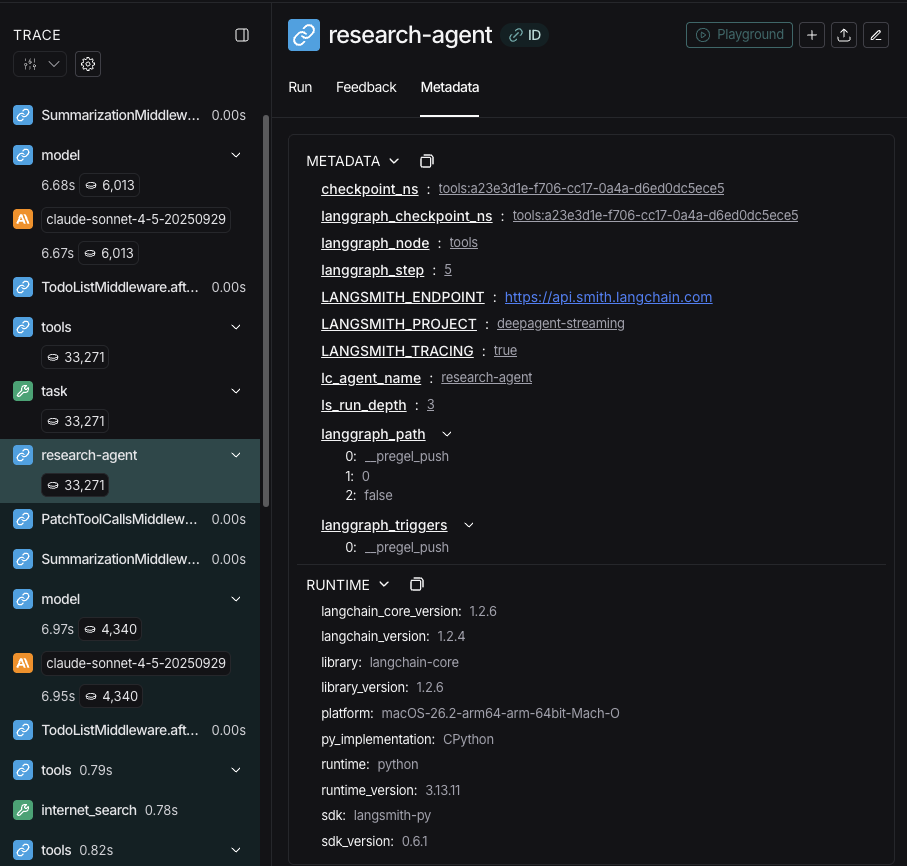
Streaming tracing information 时,agents 的 names 会作为 metadata 中的 lc_agent_name 可用。
Review tracing information 时,你可以使用此 metadata 区分 data 来自哪个 agent。
下面的 example 创建一个名为 main-agent 的 deep agent,以及一个名为 research-agent 的 subagent:
import os
from typing import Literal
from tavily import TavilyClient
from deepagents import create_deep_agent

tavily_client = TavilyClient(api_key=os.environ["TAVILY_API_KEY"])

def internet_search(
    query: str,
    max_results: int = 5,
    topic: Literal["general", "news", "finance"] = "general",
    include_raw_content: bool = False,
):
    """Run a web search"""
    return tavily_client.search(
        query,
        max_results=max_results,
        include_raw_content=include_raw_content,
        topic=topic,
    )

research_subagent = {
    "name": "research-agent",
    "description": "Used to research more in depth questions",
    "system_prompt": "You are a great researcher",
    "tools": [internet_search],
    "model": "google_genai:gemini-3.5-flash",  # Optional override, defaults to main agent model
}
subagents = [research_subagent]

agent = create_deep_agent(
    model="google_genai:gemini-3.5-flash",
    subagents=subagents,
    name="main-agent"
)
"research-agent" 的 subagent 会在任何 associated agent run metadata 中包含 {'lc_agent_name': 'research-agent'}:
Structured output
Subagents 支持 structured output,因此 parent agent 会接收 predictable、parseable JSON,而不是 free-form text。
Subagents 的 structured output 需要 deepagents>=0.5.3。
response_format。Subagent 完成后,其 structured response 会 JSON-serialized,并作为 ToolMessage content 返回给 parent agent。Schema 接受 create_agent 支持的任何内容:Pydantic models、ToolStrategy(...)、ProviderStrategy(...) 或 raw schema type。
from pydantic import BaseModel, Field

from deepagents import create_deep_agent


class ResearchFindings(BaseModel):
    """Structured findings from a research task."""
    summary: str = Field(description="Summary of findings")
    confidence: float = Field(description="Confidence score from 0 to 1")
    sources: list[str] = Field(description="List of source URLs")

research_subagent = {
    "name": "researcher",
    "description": "Researches topics and returns structured findings",
    "system_prompt": "Research the given topic thoroughly. Return your findings.",
    "tools": [web_search],
    "response_format": ResearchFindings,
}

agent = create_deep_agent(
    model="claude-sonnet-4-6",
    subagents=[research_subagent],
)

result = await agent.ainvoke(
    {"messages": [{"role": "user", "content": "Research recent advances in quantum computing"}]}
)

# The parent's ToolMessage contains JSON-serialized structured data:
# '{"summary": "...", "confidence": 0.87, "sources": ["https://..."]}'
response_format 时,parent 会按原样接收 subagent 的 last message text。设置后,parent 始终会获得匹配 schema 的 valid JSON,这在 parent 需要 programmatically process result 或将其传给 downstream tools 时很有用。
有关 schema types 和 strategies(tool calling vs. provider-native)的完整 details,请参阅 Structured output。
The general-purpose subagent
除了任何 user-defined subagents,每个 deep agent 始终都可以 access 一个 general-purpose subagent。此 subagent:
Override the general-purpose subagent
在 subagents list 中包含 name="general-purpose" 的 subagent,以替换 default。使用此方式为 general-purpose subagent 配置不同 model、tools 或 system prompt:
from deepagents import create_deep_agent

# Main agent uses Gemini; general-purpose subagent uses GPT
agent = create_deep_agent(
    model="google_genai:gemini-3.5-flash",
    tools=[internet_search],
    subagents=[
        {
            "name": "general-purpose",
            "description": "General-purpose agent for research and multi-step tasks",
            "system_prompt": "You are a general-purpose assistant.",
            "tools": [internet_search],
            "model": "openai:gpt-5.4",  # Different model for delegated tasks
        },
    ],
)
enabled flag 设置为 False。
When to use it
General-purpose subagent 很适合在没有 specialized behavior 的情况下进行 context isolation。Main agent 可以将 complex multi-step task 委派给此 subagent,并获得 concise result,而不会受到 intermediate tool calls 的 bloat 影响。
Example
Main agent 不需要进行 10 次 web searches 并用 results 填满 context,而是委派给 general-purpose subagent:task(name="general-purpose", task="Research quantum computing trends")。Subagent 在内部执行所有 searches,并只返回 summary。
Skills inheritance
使用 create_deep_agent 配置 skills 时:
- General-purpose subagent:自动从 main agent 继承 skills
- Custom subagents:默认不继承 skills,请使用
skills parameter 给它们自己的 skills
只有配置了 skills 的 subagents 才会获得 SkillsMiddleware instance;没有 skills parameter 的 custom subagents 不会获得。存在该 middleware 时,skill state 在两个方向上都是 fully isolated:parent 的 skills 对 child 不可见,child 的 skills 也不会 propagate 回 parent。
from deepagents import create_deep_agent

# Research subagent with its own skills
research_subagent = {
    "name": "researcher",
    "description": "Research assistant with specialized skills",
    "system_prompt": "You are a researcher.",
    "tools": [web_search],
    "skills": ["/skills/research/", "/skills/web-search/"],  # Subagent-specific skills
}

agent = create_deep_agent(
    model="google_genai:gemini-3.5-flash",
    skills=["/skills/main/"],  # Main agent and GP subagent get these
    subagents=[research_subagent],  # Gets only /skills/research/ and /skills/web-search/
)
Best practices
Write clear descriptions
Main agent 使用 descriptions 决定调用哪个 subagent。请保持具体:
✅ Good: "Analyzes financial data and generates investment insights with confidence scores"
❌ Bad: "Does finance stuff"
Keep system prompts detailed
包含关于如何 use tools 和 format outputs 的具体 guidance:
research_subagent = {
    "name": "research-agent",
    "description": "Conducts in-depth research using web search and synthesizes findings",
    "system_prompt": """You are a thorough researcher. Your job is to:

    1. Break down the research question into searchable queries
    2. Use internet_search to find relevant information
    3. Synthesize findings into a comprehensive but concise summary
    4. Cite sources when making claims

    Output format:
    - Summary (2-3 paragraphs)
    - Key findings (bullet points)
    - Sources (with URLs)

    Keep your response under 500 words to maintain clean context.""",
    "tools": [internet_search],
}
# ✅ Good: Focused tool set
email_agent = {
    "name": "email-sender",
    "tools": [send_email, validate_email],  # Only email-related
}

# ❌ Bad: Too many tools
email_agent = {
    "name": "email-sender",
    "tools": [send_email, web_search, database_query, file_upload],  # Unfocused
}
Choose models by task
不同 models 擅长不同 tasks:
subagents = [
    {
        "name": "contract-reviewer",
        "description": "Reviews legal documents and contracts",
        "system_prompt": "You are an expert legal reviewer...",
        "tools": [read_document, analyze_contract],
        "model": "google_genai:gemini-3.5-flash",  # Large context for long documents
    },
    {
        "name": "financial-analyst",
        "description": "Analyzes financial data and market trends",
        "system_prompt": "You are an expert financial analyst...",
        "tools": [get_stock_price, analyze_fundamentals],
        "model": "openai:gpt-5.4",  # Better for numerical analysis
    },
]
Return concise results
指示 subagents 返回 summaries,而不是 raw data:
data_analyst = {
    "system_prompt": """Analyze the data and return:
    1. Key insights (3-5 bullet points)
    2. Overall confidence score
    3. Recommended next actions

    Do NOT include:
    - Raw data
    - Intermediate calculations
    - Detailed tool outputs

    Keep response under 300 words."""
}
Common patterns
Multiple specialized subagents
为不同 domains 创建 specialized subagents:
from deepagents import create_deep_agent

subagents = [
    {
        "name": "data-collector",
        "description": "Gathers raw data from various sources",
        "system_prompt": "Collect comprehensive data on the topic",
        "tools": [web_search, api_call, database_query],
    },
    {
        "name": "data-analyzer",
        "description": "Analyzes collected data for insights",
        "system_prompt": "Analyze data and extract key insights",
        "tools": [statistical_analysis],
    },
    {
        "name": "report-writer",
        "description": "Writes polished reports from analysis",
        "system_prompt": "Create professional reports from insights",
        "tools": [format_document],
    },
]

agent = create_deep_agent(
    model="google_genai:gemini-3.5-flash",
    system_prompt="You coordinate data analysis and reporting. Use subagents for specialized tasks.",
    subagents=subagents
)
- Main agent 创建 high-level plan
- 将 data collection 委派给 data-collector
- 将 results 传给 data-analyzer
- 将 insights 发送给 report-writer
- 编译 final output
每个 subagent 都使用只聚焦于自身 task 的 clean context 工作。
Context management
当你使用 runtime context invoke parent agent 时,该 context 会自动 propagate 到所有 subagents。每个 subagent run 都会接收你在 parent invoke / ainvoke call 上传入的相同 runtime context。
这意味着在任何 subagent 内运行的 tools 都可以 access 你提供给 parent 的相同 context values:
from dataclasses import dataclass

from deepagents import create_deep_agent
from langchain.messages import HumanMessage
from langchain.tools import tool, ToolRuntime

@dataclass
class Context:
    user_id: str
    session_id: str

@tool
def get_user_data(query: str, runtime: ToolRuntime[Context]) -> str:
    """Fetch data for the current user."""
    user_id = runtime.context.user_id
    return f"Data for user {user_id}: {query}"

research_subagent = {
    "name": "researcher",
    "description": "Conducts research for the current user",
    "system_prompt": "You are a research assistant.",
    "tools": [get_user_data],
}

agent = create_deep_agent(
    model="google_genai:gemini-3.5-flash",
    subagents=[research_subagent],
    context_schema=Context,
)

# Context flows to the researcher subagent and its tools automatically
result = await agent.invoke(
    {"messages": [HumanMessage("Look up my recent activity")]},
    context=Context(user_id="user-123", session_id="abc"),
)
Per-subagent context
所有 subagents 都会接收相同 parent context。若要传入特定于某个 subagent 的 configuration,请在 flat context mapping 中使用 namespaced keys(用 subagent name 作为 key prefix,例如 researcher:max_depth),或 将这些 settings 建模为 context type 上的 separate fields:
from dataclasses import dataclass

from langchain.messages import HumanMessage
from langchain.tools import tool, ToolRuntime

@dataclass
class Context:
    user_id: str
    researcher_max_depth: int | None = None
    fact_checker_strict_mode: bool | None = None

result = await agent.invoke(
    {"messages": [HumanMessage("Research this and verify the claims")]},
    context=Context(
        user_id="user-123",
        researcher_max_depth=3,
        fact_checker_strict_mode=True,
    ),
)

@tool
def verify_claim(claim: str, runtime: ToolRuntime[Context]) -> str:
    """Verify a factual claim."""
    strict_mode = runtime.context.fact_checker_strict_mode or False
    if strict_mode:
        return strict_verification(claim)
    return basic_verification(claim)
lc_agent_name metadata(与 streaming 中使用的值相同)来判断哪个 agent 发起了 call:
from langchain.tools import tool, ToolRuntime

@tool
def shared_lookup(query: str, runtime: ToolRuntime) -> str:
    """Look up information."""
    agent_name = runtime.config.get("metadata", {}).get("lc_agent_name")
    if agent_name == "fact-checker":
        return strict_lookup(query)
    return general_lookup(query)
runtime.context 读取 agent-specific settings,并在 branching tool behavior 时从 runtime.config metadata 读取 lc_agent_name。
from langchain.tools import tool, ToolRuntime

@tool
def flexible_search(query: str, runtime: ToolRuntime[Context]) -> str:
    """Search with agent-specific settings."""
    agent_name = runtime.config.get("metadata", {}).get("lc_agent_name", "unknown")
    ctx = runtime.context
    if agent_name == "researcher":
        max_results = ctx.researcher_max_depth or 5
    else:
        max_results = 5
    include_raw = False

    return perform_search(query, max_results=max_results, include_raw=include_raw)
Troubleshooting
Subagent not being called
Problem:Main agent 试图自己完成工作,而不是 delegating。
Solutions:
-
让 descriptions 更具体:
# ✅ Good
{"name": "research-specialist", "description": "Conducts in-depth research on specific topics using web search. Use when you need detailed information that requires multiple searches."}

# ❌ Bad
{"name": "helper", "description": "helps with stuff"}
-
指示 main agent delegate:
agent = create_deep_agent(
    model="google_genai:gemini-3.5-flash",
    system_prompt="""...your instructions...

    IMPORTANT: For complex tasks, delegate to your subagents using the task() tool.
    This keeps your context clean and improves results.""",
    subagents=[...]
)
Context still getting bloated
Problem:虽然使用了 subagents,但 context 仍然被填满。
Solutions:
-
指示 subagent 返回 concise results:
system_prompt="""...

IMPORTANT: Return only the essential summary.
Do NOT include raw data, intermediate search results, or detailed tool outputs.
Your response should be under 500 words."""
-
对 large data 使用 filesystem:
system_prompt="""When you gather large amounts of data:
1. Save raw data to /data/raw_results.txt
2. Process and analyze the data
3. Return only the analysis summary

This keeps context clean."""
Wrong subagent being selected
Problem:Main agent 为 task 调用了不合适的 subagent。
Solution:在 descriptions 中清晰区分 subagents:
subagents = [
    {
        "name": "quick-researcher",
        "description": "For simple, quick research questions that need 1-2 searches. Use when you need basic facts or definitions.",
    },
    {
        "name": "deep-researcher",
        "description": "For complex, in-depth research requiring multiple searches, synthesis, and analysis. Use for comprehensive reports.",
    }
]

