

Overview
Agents 使用 memory 和 execution environment 中的信息完成 tasks。 在 production 中,有几个 primitives 会决定 information 如何共享和访问:- Thread:单次 conversation。默认情况下,message history 和 scratch files 限定在 thread 内,不会 carry over。
- User:与你的 agent 交互的人。Memory 和 files 可以对单个 user 私有,也可以跨 users 共享。Identity 和 authorization 来自你的 auth layer。
- Assistant:已配置的 agent instance。Memory 和 files 可以绑定到一个 assistant,也可以跨所有 assistants 共享。
- LangSmith Deployments:带 auth、webhooks 和 cron 的 managed infrastructure
- Production considerations:invocation、multi-tenancy、authentication、credentials、async 和 durability
- Memory:跨 conversations 持久化 information
- Execution environment:file storage 和 code execution
- Guardrails:rate limiting、error handling 和 data privacy
- Frontend:将你的 UI 连接到 deployed agent
LangSmith Deployments
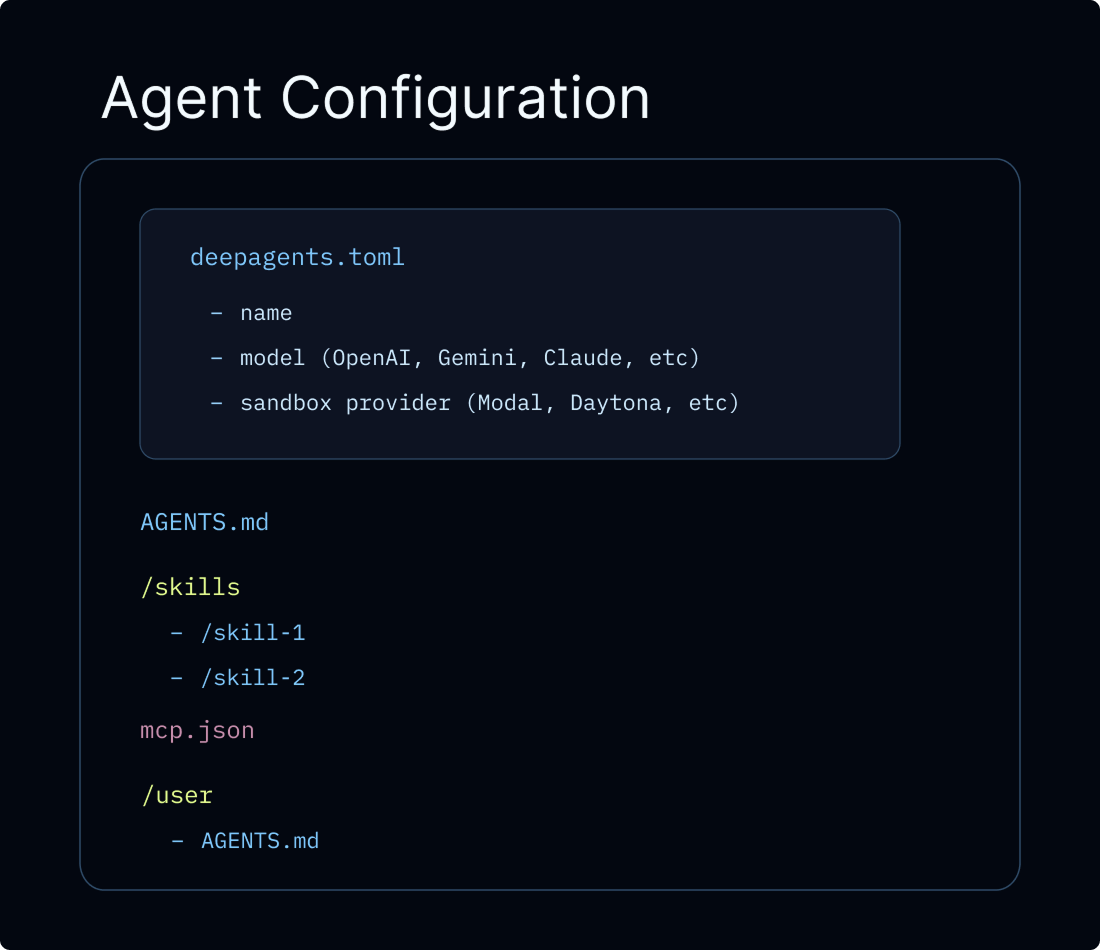 将 Deep Agent 推向 production 的推荐路径是 Managed Deep Agents,这是一个 API-first hosted runtime,用于在 LangSmith 中创建、运行和运营 deep agents。Managed Deep Agents 当前处于 private preview(join the waitlist)。对于需要 custom application code、custom routes、advanced authentication 或完整 Agent Server APIs 的 teams,你可以直接配置 LangSmith Deployment。任一路径都会 provision agent 所需 infrastructure:threads、runs、store 和 checkpointer,因此你不需要自行设置。传统 LangSmith Deployment 还会开箱提供 authentication、webhooks、cron jobs 和 observability,并可通过 MCP 或 A2A 暴露 agent。
除非另有说明,本页所有 code snippets 都使用以下
将 Deep Agent 推向 production 的推荐路径是 Managed Deep Agents,这是一个 API-first hosted runtime,用于在 LangSmith 中创建、运行和运营 deep agents。Managed Deep Agents 当前处于 private preview(join the waitlist)。对于需要 custom application code、custom routes、advanced authentication 或完整 Agent Server APIs 的 teams,你可以直接配置 LangSmith Deployment。任一路径都会 provision agent 所需 infrastructure:threads、runs、store 和 checkpointer,因此你不需要自行设置。传统 LangSmith Deployment 还会开箱提供 authentication、webhooks、cron jobs 和 observability,并可通过 MCP 或 A2A 暴露 agent。
除非另有说明,本页所有 code snippets 都使用以下 langgraph.json:
langgraph.json
langgraph.json 是告诉 LangGraph platform 如何 build 和 run 你的 application 的 configuration file。它位于 project root,并且 local development(使用 langgraph dev)和 production deployment 都需要它。关键 fields 如下:
| Field | Description |
|---|---|
dependencies | 要 install 的 packages。["."] 会将当前 directory 作为 package 安装(读取 requirements.txt、pyproject.toml 或 package.json)。 |
graphs | 将 graph IDs 映射到其 code locations。每个 entry 都是 "<id>": "./<file>:<variable>",其中 <id> 是你通过 API invoke graph 时使用的名称,<variable> 是从 <file> export 的 compiled graph 或 constructor function。 |
env | 包含 environment variables(API keys、secrets)的 .env file path。这些 variables 会在 build time 设置,并在 runtime 可用。 |
Production considerations
Invoking the agent
在 production 中,每次 invocation 都应携带两个 run-level parameters:thread_id(通过config={"configurable": {"thread_id": ...}}传入):conversation 的 stable identifier。checkpointer 使用它持久化并 resume message history,因此 follow-up turns 会延续同一个 conversation。生成新的thread_id可以开始 fresh conversation。context:你的 tools 和 middleware 在 invocation time 读取的 per-run data,例如user_id、API keys、feature flags 或 session metadata。使用context_schema定义 shape,并通过runtime.context访问。请参阅 Runtime context。
thread_id 传给每次 run:
Multi-tenancy
当你的 agent 服务多个 users 时,你需要处理三件事:验证每个 user 的身份、控制他们可访问的内容,以及管理 agent 代表他们执行操作时使用的 credentials。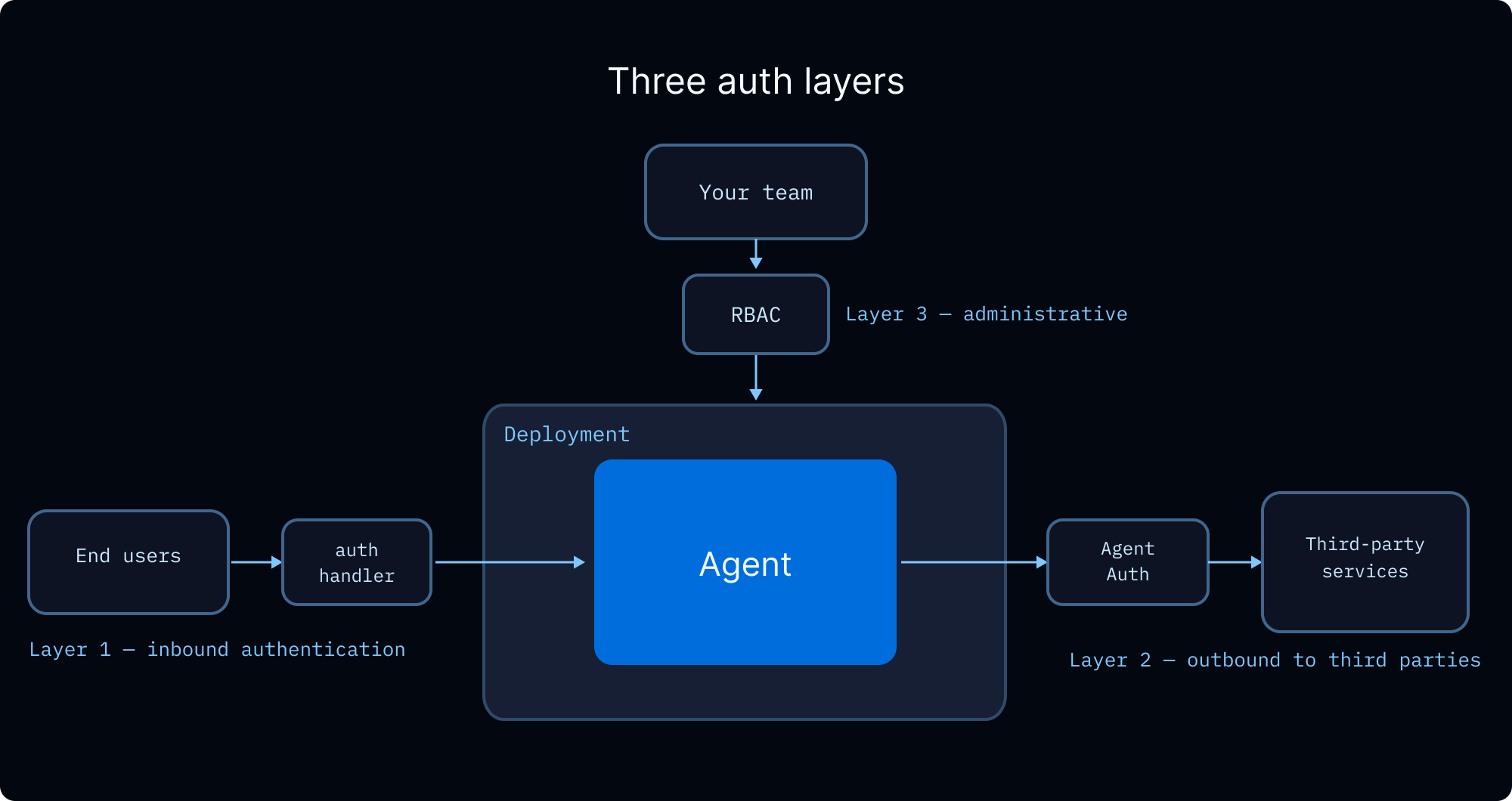
User identity and access control
LangSmith Deployments 支持 custom authentication 来建立 user identity,并支持 authorization handlers 来控制对 threads、assistants 和 store namespaces 等 resources 的 access。Authorization handlers 会在 authentication 成功后运行,并可以:- 使用 ownership metadata 标记 resources(例如
owner: user_id) - 返回 filters,让 users 只能看到自己的 resources
- 对 unauthorized operations 返回 HTTP 403 拒绝 access
Team access control (RBAC)
LangSmith 的 role-based access control 管理你 team 中谁可以 deploy、configure 和 monitor agents。这与上面的 end-user authorization 是分开的。| Role | Access |
|---|---|
| Workspace Admin | 完整 permissions,包括 settings 和 member management |
| Workspace Editor | 创建和修改 resources,但不能 delete runs 或 manage members |
| Workspace Viewer | Read-only access |
End-user credentials
当你的 agent 需要代表 user 调用 external APIs(例如读取他们的 GitHub repos、发送 Slack messages、查询他们的 data warehouse)时,你需要一种方式将 user credentials 传给 agent,而不是硬编码它们。 OAuth via Agent Auth. Agent Auth 提供 managed OAuth 2.0 flow。配置 OAuth provider 后,agent 可以请求 scoped to each user 的 tokens。首次使用时,agent 会 interrupts execution 并展示 OAuth consent URL。User 完成 authentication 后,agent 会带着 valid token resume。Tokens 会自动 stored 和 refreshed。Async
LLM-based applications 高度 I/O-bound:调用 language models、databases 和 external services。Async programming 让这些 operations 并发运行而不是阻塞,从而提升 throughput 和 responsiveness。LangChain 遵循在 async method names 前加
a 的约定(例如 ainvoke、abefore_agent、astream)。Sync 和 async variants 位于同一个 class 或 namespace 中。- 创建 async tools。 LangChain 会在单独 thread 中运行 sync tools 以避免 blocking,但 native async 可以完全避免 threading overhead。
- 使用 async middleware methods。 Custom middleware 应实现 async hooks(例如
abefore_agent而不是before_agent)。 - 对 external resource lifecycle 使用 async。 创建 sandboxes 或连接 MCP servers 涉及 network calls,应该被 awaited。这就是 provision 这些 resources 的 graph factories 为 async 的原因。
Durability
Deep Agents 运行在 LangGraph 上,LangGraph 开箱提供 durable execution。persistence layer 会在每一步 checkpoint state,因此因 failure、timeout 或 human-in-the-loop pause 中断的 run,可以从其最后记录的 state resume,而不需要重新处理 previous steps。对于会 spawn 许多 subagents 的 long-running deep agents,这意味着 mid-run failure 不会丢失 completed work。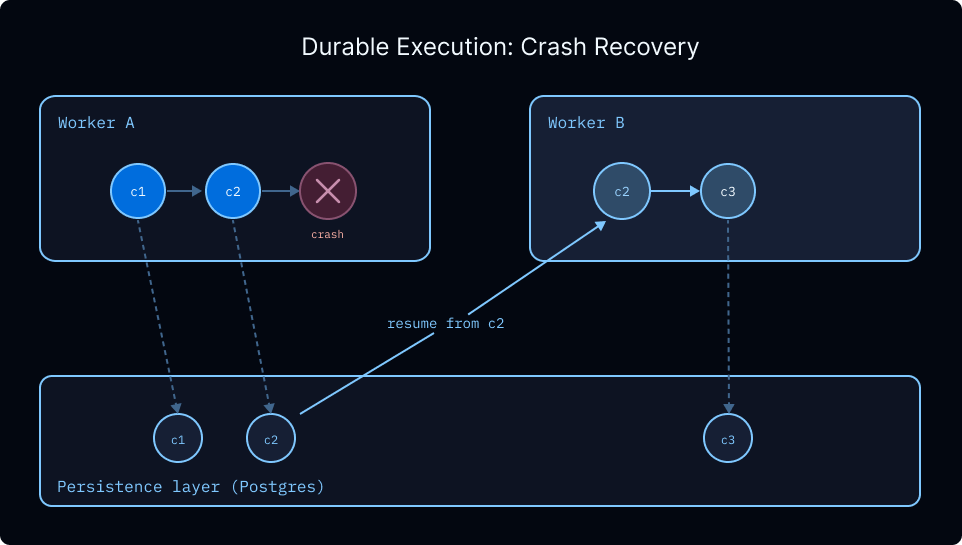 Checkpointing 还支持:
- Indefinite interrupts。 Human-in-the-loop workflows 可以暂停数分钟或数天,并从离开的位置精确 resume。
- Time travel。 每个 checkpointed step 都是一个可以 rewind 的 snapshot,让你在出错时从 earlier state replay。
- 安全处理 sensitive operations。 对于涉及 payments 或其他 irreversible actions 的 workflows,checkpoints 提供 audit trail 和 recovery point,可检查导致 action 的 exact state。
Memory
没有 memory 时,每次 conversation 都从零开始。Memory 让你的 agent 在 conversations 之间保留 information(user preferences、learned instructions、past experiences),从而随着时间个性化其 behavior。Memory types overview 请参阅 memory concepts guide。
Scoping
Memory 始终跨 conversations persistent。主要问题是它如何跨 user 和 assistant boundaries scoped。正确 scope 取决于谁应该查看和修改 data:| Scope | Namespace | Use case | Example |
|---|---|---|---|
| User(推荐默认值) | (user_id) | Per-user preferences 和 context | ”I prefer concise responses” |
| Assistant | (assistant_id) | 一个 assistant 的 shared instructions | ”Cap posts at 280 characters” |
| Global | (org_id) | 面向所有 users 和 assistants 的 read-only policies | ”Never disclose internal pricing” |
Configuration
在 Deep Agents 中,memory 以 files 形式存储在 virtual filesystem 中。默认情况下,files scoped 到单个 thread(conversation),不会跨 threads 共享。 若要跨 threads 共享 memory,请将/memories/ 之类的 path route 到写入 LangGraph Store 的 StoreBackend。使用 CompositeBackend 可以同时为 agent 提供 thread-scoped scratch space 和 cross-thread long-term memory。
下方展示的
rt.server_info 和 rt.execution_info namespace patterns 需要 deepagents>=0.5.0。- User (recommended)
- Assistant
- User
- Organization
按
user_id 设置 namespace。每个 user 都有自己的 private memory。这是推荐默认值,因为大多数 applications 部署单个 assistant。agent.py
Execution environment
在本地,agents 可以直接 read 和 write disk 上的 files,并运行 shell commands。在 production 中,你需要考虑 isolation 和 persistence。正确设置取决于你的 agent 是否需要 execute code:- Filesystem backends 适用于 agent 只需要 read 和 write files 的情况。请选择匹配 persistence needs 的 backend:thread-scoped scratch space、cross-thread storage,或二者混合。
- Sandboxes 会添加带
executetool 的 isolated container,用于运行 shell commands。如果 agent 需要 run code、install packages,或执行 file I/O 之外的操作,请使用 sandbox。
Filesystem
根据需要持久化的内容选择 backend:- StateBackend(默认):thread-scoped scratch space。Files 通过你的 checkpointer 在 thread 的 turns 之间 persist,但不跨 threads 共享。每一步都会 checkpoint,因此避免写入 large files。
- StoreBackend:可跨 conversations 存活的 cross-thread storage。使用 namespace factory 设置 scope。
-
CompositeBackend:混合二者。默认使用 thread-scoped scratch space,并为
/memories/等 specific paths 设置 cross-thread routes。 -
ContextHubBackend:LangSmith Hub repo(owner/name或name)中的 durable files。当你希望获得 LangSmith-native persistence,而不想 provision 单独 LangGraph store 时,请使用它。
Sandboxes
如果你的 agent 需要 run code(不仅是 read 和 write files),请使用 sandbox。Sandboxes 同时提供 filesystem 和用于运行 shell commands 的execute tool,所有操作都在 isolated container 内完成。这种 isolation 也会保护你的 host:如果 agent 的 code 耗尽 memory 或 crash,只有 sandbox 受影响。你的 server 会继续运行。
Lifecycle
关键决策是 sandbox 存活多久。每个 conversation 是否获得 fresh sandbox,还是多个 conversations 共享 persistent environment?下方 examples 使用 async graph factory,而不是 static graph,因为 sandbox 需要
thread_id 或 assistant_id 来查找或创建正确 sandbox。Graph factories 不接收完整 Runtime(没有 server_info 或 execution_info);相反,它接受 RunnableConfig,并从 config["configurable"] 读取 thread_id 和 assistant_id。Factory 是 async 的,因为 sandbox creation 是 I/O-bound operation,需要 invocation time 才可用的 per-run information。- Thread-scoped (most common)
- Assistant-scoped
每个 conversation 都获得自己的 sandbox。graph factory 从 run config 读取
thread_id,因此每个 thread 都自动获得自己的 isolated environment。Provider 的 label-based lookup 会处理跨 runs 的 deduplication。当 sandbox TTL 过期时会 cleanup。agent.py
agent variable 是 async function(不是 compiled graph),server 会将其视为 graph factory,并在每次 run 时调用它、注入 config。Factory 会通过 provider 的 label-based search 查找或创建 sandbox,并返回连接到该 sandbox 的 fresh agent graph。
使用 langgraph deploy 部署后,从 application code 使用 SDK invoke agent。无论 scope 如何,client-side code 都相同。Scoping 完全由上方 agent factory 处理,但 behavior 不同:
- Thread-scoped
- Assistant-scoped
每个 thread 都有自己的 sandbox。同一个 thread 内的 follow-up messages 会复用同一个 sandbox,但 new thread 总是从 fresh sandbox 开始,没有 previous conversations 的 leftover files 或 installed packages。
client.py
File transfers
Sandboxes 是 isolated containers,因此你的 application code 不能直接访问其中的 files。使用upload_files() 和 download_files() 在 sandbox boundary 两侧移动 data:
- 在 agent 运行前 seed sandbox:上传 user files、skill scripts、configuration 或 persistent memories,让 agent 从一开始就拥有所需内容
- 在 agent 完成后 retrieve results:下载 generated artifacts(reports、plots、exports),并将 updated memories 同步回来供 future conversations 使用
Example: syncing skills and memories with custom middleware
Example: syncing skills and memories with custom middleware
Agent 需要 execute 的 Skill scripts 必须在 agent 运行前上传到 sandbox。你也可能希望同步 memories,让 agent 可以在 container 内 read 和 update 它们。使用带
before_agent 和 after_agent hooks 的 custom middleware 跨 sandbox boundary 移动 files:agent.py
Managing secrets
Sandboxes 是 isolated containers,因此来自 host 的 environment variables 在其中不可用。有两种方式可以向 sandbox code 提供 API keys 和其他 secrets: Auth proxy(推荐)。 sandbox auth proxy 会拦截来自 sandbox 的 outbound requests,并自动注入 authentication headers。Sandbox code 正常调用 external APIs,proxy 会根据 destination host 添加正确 credentials。这意味着 API keys 永远不会出现在 sandbox code、environment variables 或 logs 中。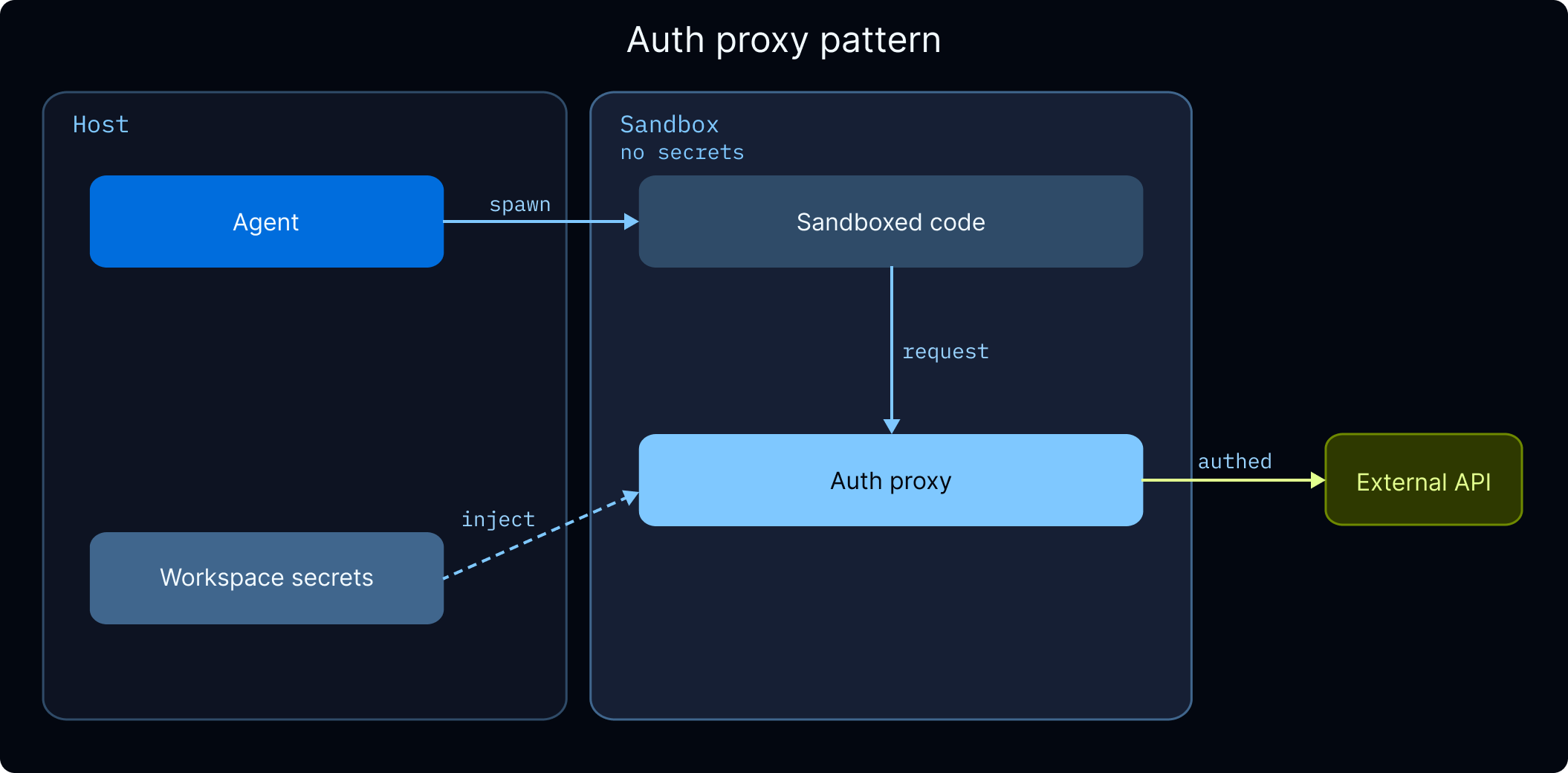
${SECRET_KEY} references 会解析到 LangSmith workspace settings 中存储的 secrets。创建引用这些 secrets 的 template 前,请先在那里配置 secrets。
Workspace secrets. 对于不需要 proxy-based injection 的 API keys(例如 agent server 本身使用而非 sandbox code 使用的 keys),请将其作为 workspace secrets 存储在 LangSmith 中。这些会在 workspace 中所有 agents 的 runtime 作为 environment variables 可用。
Guardrails
Production 中的 agents 会 autonomously 运行,这意味着它们可能 indefinite loop、hit rate limits,或处理包含 sensitive information 的 user data。Deep Agents 提供两层 protection:- Permissions:Declarative allow/deny rules,控制 agent 可以 read 或 write 哪些 files 和 directories。使用 permissions 将 agent isolate 到 working directory、保护 sensitive files,或 enforce read-only memory。
- Middleware:围绕 model 和 tool calls 的 hooks,用于 rate limiting、error handling 和 data privacy。

Rate limiting
这里的 rate limiting 指限制 agent 在一次 run 内自己的 LLM 和 tool usage,而不是 incoming requests 的 API gateway rate limiting。 如果没有 limits,一个 confused agent 可能会在几分钟内通过反复调用同一个 tool 或发起数百次 model calls 耗尽你的 LLM API budget。请对每次 run 内的 model calls 和 tool executions 都设置 caps:run_limit 限制单次 invocation 内的 calls(每 turn reset)。使用 thread_limit 限制整个 conversation 内的 calls(需要 checkpointer)。完整 configuration 请参阅 ModelCallLimitMiddleware 和 ToolCallLimitMiddleware。
Handling errors
并非所有 errors 都应以同一种方式处理。Transient failures(network timeouts、rate limits)应自动 retry。LLM 可恢复的 errors(bad tool output、parsing failures)应反馈给 model。需要 human input 的 errors 应 pause agent。带 code examples 的完整拆解请参阅 Handle errors appropriately。 Middleware 处理 transient case。Model calls 和 tool calls 各自拥有带 exponential backoff 的 retry middleware。如果 primary model provider 完全 down,fallback middleware 会切换到 alternative:read_file 不会因 retry 获益,但 timed out 的 web search 很可能会。完整 configuration 请参阅 ModelRetryMiddleware 和 ModelFallbackMiddleware。
Data privacy
如果你的 agent 处理可能包含 emails、credit card numbers 或其他 PII 的 user input,你可以在其到达 model 或存储到 logs 前检测并处理它:redact(替换为 [REDACTED_EMAIL])、mask(像 ****-****-****-1234 这样的 partial masking)、hash(deterministic hash)和 block(raise an error)。你也可以为 domain-specific patterns 编写 custom detectors。
完整 configuration 请参阅 PIIMiddleware。
可用 middleware 的完整列表请参阅 prebuilt middleware。
Frontend
Deep Agents 使用useStream 将你的 UI 连接到 agent backend。useStream 是 frontend hook(适用于 React、Vue、Svelte 和 Angular),可以从你的 agent 实时 stream messages、subagent progress 和 custom state。
本地开发时,useStream 指向 http://localhost:2024。在 production 中,将它指向你的 LangSmith Deployment,并配置 reconnection,避免 users 在 connection drops 时丢失进度。
reconnectOnMount 会自动接上 in-progress run。如果 user 在 agent 工作时 refresh,他们会看到它继续,而不是 blank screen。fetchStateHistory 会加载 thread 的 full conversation history,因此 returning users 可以看到 previous messages。
对于会 spawn 许多 subagents 的 deep agent workflows,submit 时请设置较高的 recursionLimit,避免 long-running executions 被截断:
Connect these docs to Claude, VSCode, and more via MCP for real-time answers.